The SSD vs HDD for NVR storage question sounds like it should have a modern answer — SSDs won the laptop war, surely they win here too? They did not, and the reason teaches you how recorders actually work. A surveillance recorder needs three things from its drive: huge capacity, honest endurance under nonstop writing, and a price per terabyte that lets you keep weeks of footage. On all three, the mechanical hard drive still rules. This guide explains why, shows where SSDs genuinely win, and settles which drive is better for your surveillance system.
Key takeaways
- For the main recorder storage, surveillance HDDs win on the metric that matters: terabytes per pound.
- Recorders write sequentially around the clock — the workload HDDs handle gracefully and cheaply.
- SSD advantages — speed, silence, shock resistance — solve problems recorders mostly do not have.
- The real SSD home in surveillance: vehicles and vibration-heavy sites where mechanical drives suffer.
- Whatever you choose, choose surveillance-grade — desktop drives of either kind are the wrong answer.
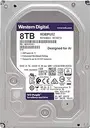
A surveillance-grade hard drive built for continuous recording
What a recorder actually asks of its drive
Picture the workload: several video streams arriving simultaneously, written to disk second after second, all day, every day, with the occasional playback read in between. That is sequential writing — the gentlest pattern for a mechanical drive, whose head glides along writing continuously. The dramatic SSD advantages live elsewhere: random access speed, boot times, app launches — operations a recorder performs rarely or never. Surveillance is the one mainstream workload where the old technology's strengths line up exactly with the job.
The comparison that matters
| Measure | Surveillance HDD (Purple/SkyHawk) | SSD |
|---|---|---|
| Cost per terabyte | The clear winner | Several times higher |
| Big capacities | 4, 8, 12TB routine | Large sizes get very expensive |
| 24/7 sequential writing | Designed exactly for it | Capable, but wears its cells doing it |
| Vibration and shock | Sensitive — needs stable mounting | Immune — no moving parts |
| Noise and heat | Audible hum, warm | Silent, cooler |
| Best surveillance role | Main recorder storage | Mobile NVRs, vehicles, harsh sites |
The endurance question, honestly
The old argument said SSDs die young under constant writing. Modern reality is more nuanced: a decent 1TB SSD is rated for hundreds of terabytes written, while a four-camera 4MP system writes roughly 47TB a year — meaning several years of service before wear-out on paper. So endurance alone no longer disqualifies SSDs; economics does. For the price of a modest SSD you buy several times the HDD capacity, which converts directly into weeks more retention — and retention, not write speed, is what saves you the day an incident surfaces from two weeks ago.
Where SSDs genuinely win in surveillance
Put an SSD wherever the drive gets shaken or cooked. Mobile NVRs in buses, trucks and heavy equipment are the textbook case: mechanical drives suffer on Egyptian roads, while SSDs shrug off every pothole. Vibration-heavy industrial spots — near presses, generators, compressors — earn the same answer. Fanless silent cabinets in offices, and extreme-heat enclosures where every degree counts, complete the list. In those environments the SSD premium is not a luxury; it is cheaper than replacing dead mechanical drives twice a year.
Practical recommendations by scenario
- Home, shop, office, factory recorder: surveillance HDD sized by the retention math — the default that is almost always right.
- Bus, truck, mobile unit: industrial SSD or an NVR designed for vehicles — mechanical drives need not apply.
- Vibrating industrial corner: SSD, or relocate the recorder to a calmer room and keep the HDD.
- Long retention on a budget: bigger HDD plus H.265+ compression beats any SSD plan by kilometers.
How surveillance hard drives and fast SSDs compare for recording duty
Frequently asked questions
Can I install a regular SSD in my NVR?
If it is on the recorder's compatibility list it will work — format it inside the recorder as usual. Just be clear on what you paid for: less capacity, so fewer retention days, for silence and shock resistance you may not need.
Would an SSD make playback faster?
Barely — playback speed is limited by decoding and the network before the drive. The smoothness you feel scrubbing footage comes from the recorder's processor, which is a reason to choose the recorder well, not the drive.
Can I mix an SSD and an HDD in one recorder?
Multi-bay recorders accept it, but the benefit is thin for typical sites — most owners get more value filling both bays with surveillance HDDs and doubling retention instead.
Are memory cards in cameras SSDs?
Same flash family, smaller package. The same buying rule applies: choose high-endurance cards made for continuous video, not ordinary phone cards — they die fast under camera duty.
Buying checks that save you later
Whichever technology you choose, three checks at the counter prevent most storage regrets. Confirm the workload rating on the label — surveillance drives state their yearly write tolerance, desktop drives stay silent. Match the warranty to the seller: a genuine local warranty card beats a gray-import discount every single time, because a dead drive with no warranty costs you the footage and the replacement together. And photograph the serial number next to your receipt; when a warranty claim comes three years later, that photo is the five-second answer.
One last habit from our support files: write the installation date on the drive with a marker. Drives age silently, and the day the recorder starts beeping, knowing whether this drive served two years or six changes the decision between a warranty claim and a planned replacement.
Related guides
- How to choose the right hard drive for your recorder
- CCTV storage optimization: get more recording days
- H.264 vs H.265 vs H.265+ compression explained
- How to choose the right NVR: a buyer's guide
- Parking and Garage Surveillance
Buy terabytes that survive the job
FastEgy stocks surveillance hard drives and vehicle-grade options beside the recorders they serve, sealed and locally warrantied. Tell us your channel count and retention target through the contact page and we will size the storage before you spend — or browse drives in the FastEgy store.